Quick note before we start: this is a redacted write-up of a real report I submitted to a private bug bounty program, shared with permission. I have kept the endpoint paths so you can follow along, but the real domain is replaced with https://[redacted-target] and I am not naming the company. The screenshots are clean redrawn versions of what I actually saw.
Hey everyone. This one is about a Server-Side Request Forgery bug, or SSRF for short. If you have not run into SSRF before, here is the short version: it is when you can make the server send requests to wherever you tell it to, instead of just to the places it is supposed to. That is dangerous because the server usually sits inside a private network and can reach things you, sitting on the outside, never could.
What I like about this finding is where it was hiding. It was not in some weird hidden API. It was sitting right inside a normal-looking settings page that almost every app has.
Where I found it
The target was a cloud security platform. In the account settings there was a "Communication Settings" area where an admin or power user could hook the app up to outside services like Jira, Zendesk, and ServiceNow. You know the kind of thing: you paste in a URL and a token, and the app connects to your ticketing system.
The settings page lived here:
https://[redacted-target]/account/[account-id]/aws-settingsThe moment I saw a field that asks me for a URL, my ears perked up. Any time an app takes a URL from me and then goes and visits it on its own, that is a classic spot for SSRF. So I decided to find out where exactly the app was sending that request, and whether I could point it somewhere it should not go.
Step 1: Feeding it an internal address
I opened the Jira integration, clicked Configure, and in the "Jira URL" field I typed an address that points back at the server itself instead of a real Jira site:
http://localhost:9001Then I put any junk value in the token field and clicked "Test Settings". The point was not to actually connect to Jira. The point was to see if the app would blindly try to reach whatever URL I gave it.
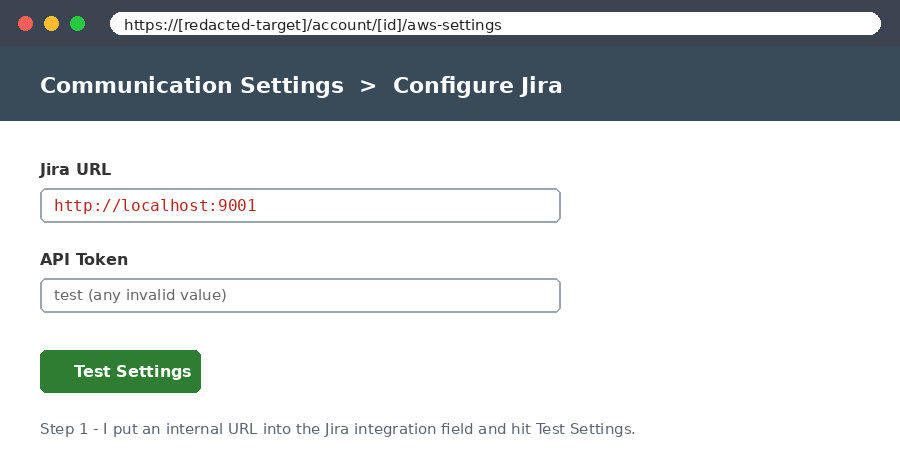
Step 2: Watching the server make the request for me
I had Burp Suite running, so I caught the request the app sent when I hit "Test Settings". Under the hood the browser was sending a POST to this endpoint:
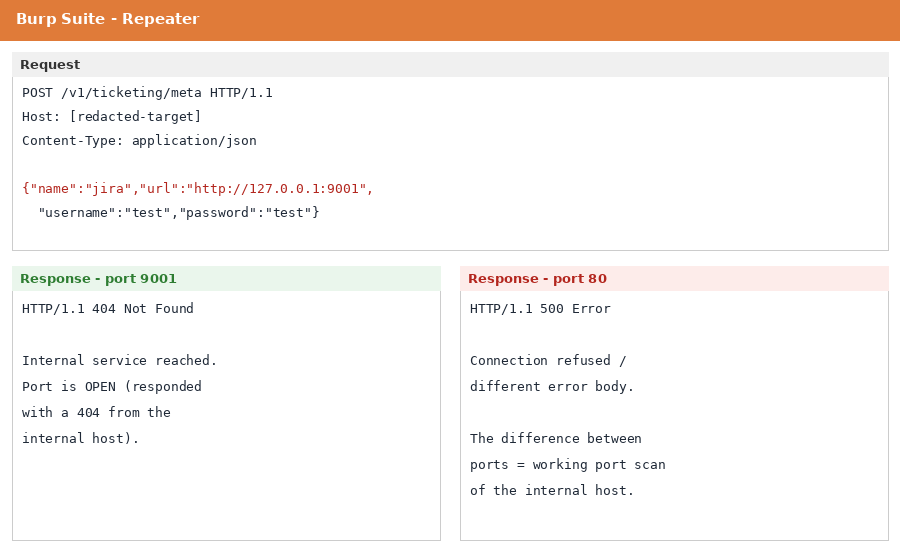
POST https://[redacted-target]/v1/ticketing/metaAnd the body had a url parameter in it, which is the value the server was about to go and fetch. So in Burp I just swapped that value for an internal address and sent it again:
{"name":"jira","url":"http://127.0.0.1:9001","username":"test","password":"test"}Here 127.0.0.1 means "the server's own machine". A safe app should refuse to fetch that. This one did not. It happily made the request, and that is the whole bug: I was now able to make the server send requests to itself and to its own internal network, on any port I picked.
Step 3: Proving it was real by reading the responses
One request on its own does not prove much. What proves it is the difference in the responses. When I pointed it at port 9001 on localhost, the server came back with a 404. When I pointed it at a different port like 80, the response was different (a connection error). That difference is the tell. It means the server really did reach out to those ports and reported back what it found. In other words, I could sit on the outside and use the server as a tool to scan its own internal network and figure out which ports were open.
The clearest proof came from the response body itself. When the server tried to reach the internal address, it handed back its own description of the request it had just made, and you can read it right there: it performed a GET to 127.0.0.1 on port 9001, hit the path /rest/api/2/issue/createmeta, and got a 404 back. That is the application telling on itself. It confirms the request really left the server and reached a service running on the internal host, which is exactly what an SSRF is supposed to let you do.
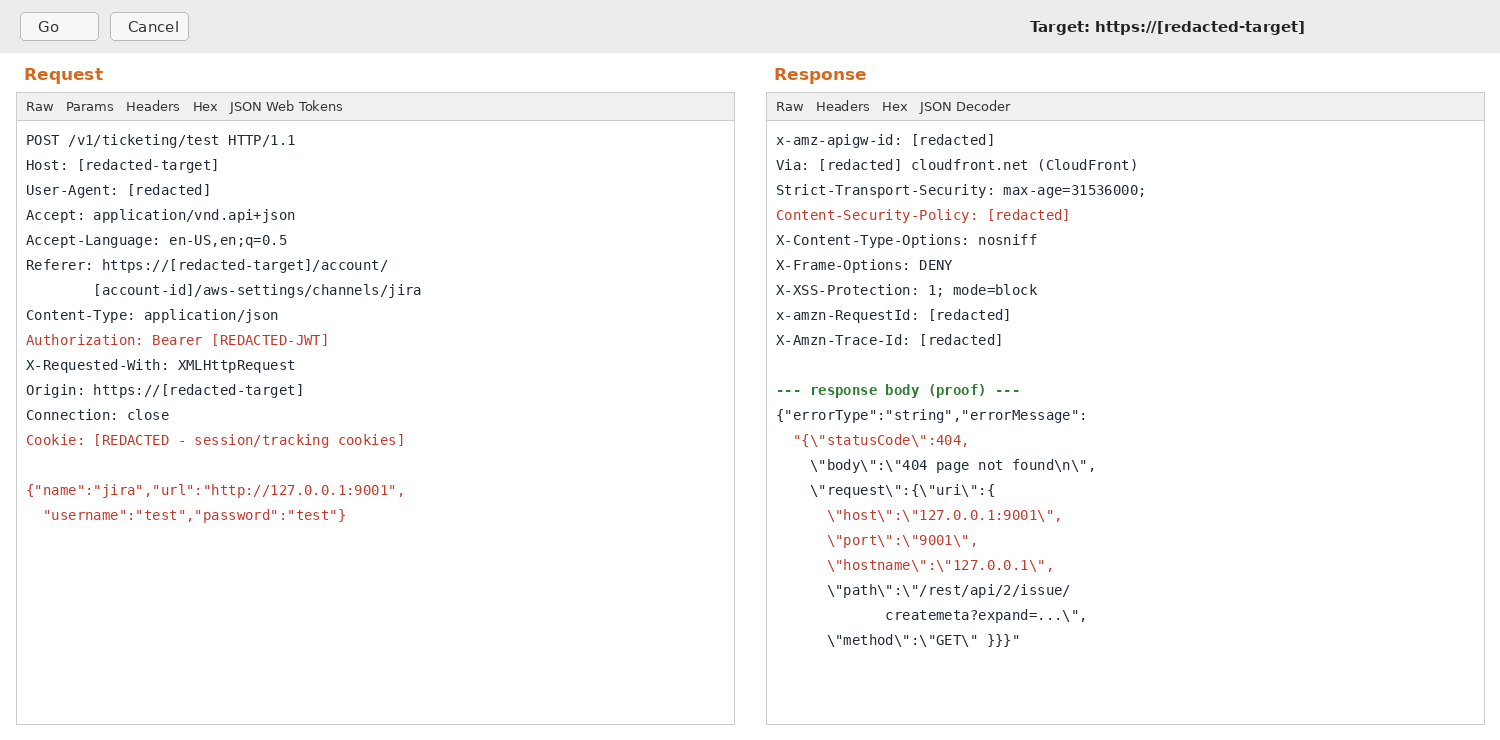
Port 9001 stood out because it was open on the internal host even though nothing on the outside should be able to reach it. It turned out to be an internal control port used by the platform's serverless backend (an AWS Lambda style runtime), the kind of thing that is meant to stay completely private. That is a good reminder that a "boring" 404 from an internal port can actually be a doorway into the infrastructure behind the app.
Why this matters
On its own, "I made the server return a 404" sounds boring. The reason it is rated as a high-impact bug is what it opens the door to. Internal networks are usually trusted networks. Services that would never be exposed to the internet often sit there with little or no authentication, because the assumption is that only other internal systems can reach them. An SSRF like this breaks that assumption. Now an outsider can knock on those internal doors using the application as a proxy, map out what is running, and look for the next thing to attack. In a cloud environment that can include sensitive internal metadata services, which is exactly why this class of bug is taken so seriously.
How it should be fixed
The fix for this is to stop trusting the URL the user typed. The server should check that url value before it ever makes the request, and refuse anything pointing at internal addresses like 127.0.0.1, localhost, or private network ranges. Even better is to flip the whole thing around and only allow connections to a short list of approved destinations, instead of trying to block the bad ones. Blocklists are easy to slip past; allowlists are much harder. And the app should not need to talk to arbitrary ports for a ticketing integration in the first place, so locking that down helps too.
What I took away from it
The biggest lesson here is simple: any field that asks you for a URL is worth a hard look. Integration settings, webhook URLs, "import from link", avatar-by-URL, PDF generators, link previews. All of these make the server go fetch something, and any of them can turn into SSRF if the server does not check where it is being sent. When you find one, do not just try localhost and give up. Try different ports and watch how the responses change, because that difference is what turns "maybe" into proof.
One more thing I appreciated about this report: the program was great to work with. They confirmed it quickly, paid a solid bounty, and were happy for me to keep digging into the internal port I had found. That kind of back-and-forth is part of what makes bug bounty fun, and it is a good reminder to keep your reports clear and your tone friendly.
Thanks for reading. Next time you see a URL field, give it a poke. :)