Quick note before we start: this is a redacted version of a real report I submitted to a private bug bounty program. I have left the endpoint paths in so you can follow exactly what I did, but I have replaced the real domain with https://[redacted-target]. The bug was fixed a long time ago. The screenshots below are clean redrawn versions of what I saw, with the real names and emails blacked out.
Hey everyone. In this post I want to walk you through one of my favourite kinds of bug: a low-privileged user being able to do things only an admin should be able to do. The fancy name for it is Broken Access Control, but the idea is simple. The app showed me a door I was not supposed to see, and when I knocked on it directly, it just opened.
Let me explain how I found it.
The setup
The target was a multi-tenant web app with a few different user roles. There were normal low-privileged users, and there were admins who could manage the whole organization, see settings, and view everyone's details. I was given a normal low-privileged account to test with. Nothing special, just the kind of account a regular user would have.
The first thing I always ask myself on an app like this is simple: the menu hides the admin stuff from me, but is that the only thing stopping me? Or is the server actually checking my role every time I ask for something? A lot of apps just hide the buttons and hope nobody types the URL by hand. So that is exactly what I tried.
Step 1: Logging in and looking around
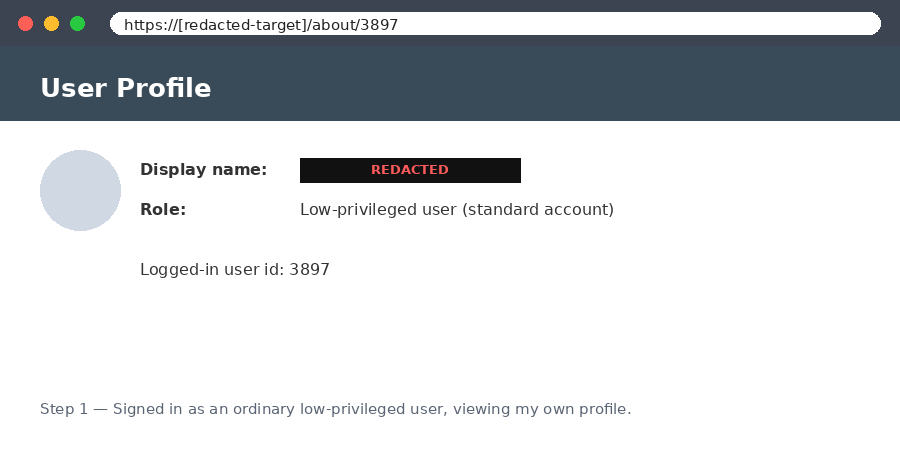
I logged in with my normal account and went to my own profile page first, just to understand how the app builds its URLs and what IDs it uses:
GET https://[redacted-target]/about/3897Nothing wrong here. This is just my own profile, exactly what I am allowed to see. But it told me something useful: the app uses simple, predictable numbers in its URLs. That is always a good sign when you are hunting for access control issues, because it means I can probably guess the URLs for things I am not supposed to reach.
Step 2: Knocking on the admin door
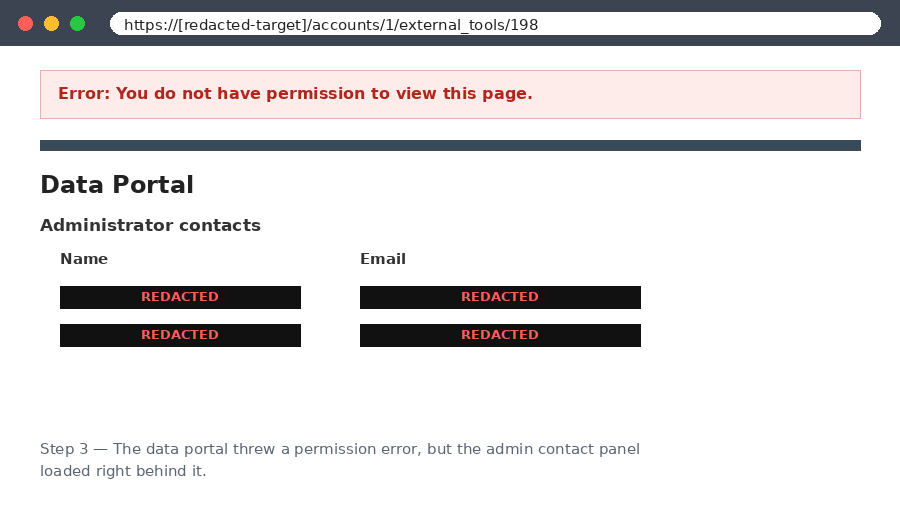
The app had an admin-only data portal. As a normal user I should never be able to touch it. I went straight to its URL anyway:
GET https://[redacted-target]/accounts/1/external_tools/198And here is the interesting part. The page showed me an error message saying I did not have permission. At first glance that looks like the app did its job and blocked me. But I did not stop at the error. I scrolled down and actually read the rest of the page. The error banner was sitting on top, but the real admin content had loaded right behind it, including the names and email addresses of the organization's admins.
This is a lesson I want to really hammer home: an error message is not the same thing as being blocked. The app told me no, but it still handed me the data. Always read the whole response, not just the red banner at the top.
Step 3: Getting into the full admin dashboard
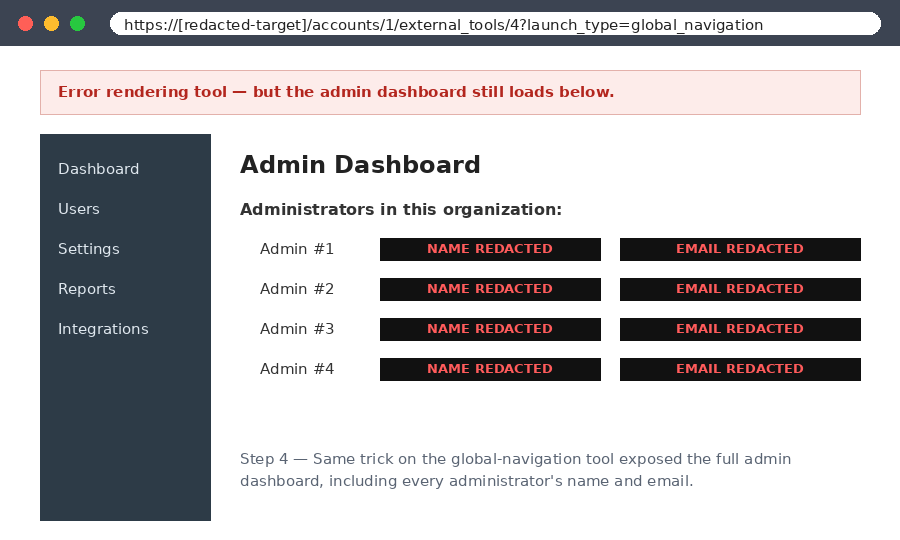
Once I knew the server was not really checking my role on these tool URLs, I tried the same trick on another one. This time it was the tool that loads in the top navigation bar for admins:
GET https://[redacted-target]/accounts/1/external_tools/4?launch_type=global_navigationSame story. There was an error on the page, but the actual administrative dashboard rendered underneath it. From a plain low-privileged account, I was now looking at the admin area and could read every administrator's name and email address. That is a regular user reaching straight into admin territory.
Why this happened
When you strip away the jargon, this bug comes down to two mistakes the app made.
First, it checked whether I was logged in, but not whether I was allowed. Those are two different questions. Being logged in just means the app knows who you are. Being allowed means the app has checked that someone with your role is permitted to see this exact thing. The admin endpoints only did the first check, so any logged-in user could reach them.
Second, the app trusted the front end to keep me out. Because the admin links were hidden from my menu, whoever built it assumed a normal user would never find them. But hiding a link does not protect anything. Anyone can type a URL. Real protection has to happen on the server, every single time.
The error message made it sneakier than usual. It looked like the app was rejecting me, so a quick test, or an automated scanner, might have ticked the box and moved on. The data was leaking the whole time, just underneath the warning.
The impact
In plain terms: a normal user could climb up to admin-level access and harvest the personal details of every administrator on the platform, their names and their email addresses. On a multi-tenant app that is a real problem. With a list of admin names and emails, an attacker has a perfect target list for phishing, and a head start on taking over the accounts that matter most. The program agreed it was serious and rated it P2 (High).
What I took away from it
If you are testing apps, the biggest takeaway is to test the server directly instead of trusting the menu. Log in as the lowest role you have, then go knock on the URLs you are not supposed to reach and see what comes back. And when you do, read the entire page, because an error banner can be hiding a full data leak right behind it. It also helps to map out how the app numbers its URLs early on, since predictable IDs make it easy to guess the pages worth trying. One more thing: be patient with the program. This report sat quiet for a bit, I sent a polite follow-up, and it ended up being bumped from P3 to P2.
A tool that makes this kind of hunting much faster is the Burp extension Autorize. You browse the app once as a high-privileged user, and it quietly repeats every request using your low-privileged session, then tells you whether each one was blocked or let through. Instead of testing one URL at a time by hand, you get a whole map of where the app forgets to check your role. For a bug exactly like this one, it would have lit up immediately.
And since bug bounty keeps changing, I have started using AI to build better wordlists for finding hidden endpoints. The trick is to feed it the naming patterns you already see in the app, things like external_tools, accounts, or launch_type, and ask it to suggest similar paths and parameters that follow the same style. You can also point it at the app's docs or its JavaScript files and have it pull out endpoint names you would have missed by hand. It is not magic, and you still have to check everything it suggests, but a smart, app-specific wordlist beats a generic one almost every time. Just remember to stay inside the program's scope.
For the developers reading this
If you build apps, the fix is boring but important. Check the user's permissions on the server for every request, not just whether they are logged in. Default to saying no, so anything admin-only rejects everyone who is not actually an admin. And when you do reject someone, stop there and send back nothing sensitive. A "soft" error that still loads the data is worse than no error at all, because it gives everyone a false sense of safety. Finally, write a quick test for each admin page that confirms a normal user gets a hard no. Those tests are cheap and they catch exactly this kind of mistake before it ships.
Thanks for reading. Go read the whole page, not just the banner. :)